

How to Use a CRM as a Photographer (And Why It Will Change Your Business)
Most photographers do not have a booking problem. They have a systems problem.
If your inquiries are sitting in your inbox like unread text messages from your ex, if you forget to follow up and remember three days later in a mild panic, or if you are manually sending contracts one by one like it is 2009, you are not running a streamlined business. You are juggling. And juggling eventually drops something. Usually a paying client.
The single biggest operational upgrade I made in my photography business was implementing a CRM. And yes, it changed everything.
What Is a CRM and Why Your Inbox Is Not One
CRM stands for Customer Relationship Management. It is simply the operating system of your business.
Your inbox is not a CRM. Your memory is not a CRM. Sticky notes are definitely not a CRM.
A real CRM tracks every inquiry, shows you where that client is in your booking process, records what emails have been sent, confirms when contracts are signed, monitors invoices, and reminds you when follow ups should happen.
Instead of reacting, you are operating. Instead of hoping you followed up, you know you did.
That difference builds confidence.

The CRM I Use in My Photography Business

I use Dubsado (affiliate link) to manage my workflows, contracts, invoices, questionnaires, and automated communication.
When a new inquiry comes in, Dubsado automatically sends a welcome email, a pricing guide, clear next steps, and a scheduler link. If someone forgets to respond, it sends a gentle follow up.
No ego. No panic. No wondering if I dropped the ball.
As a Nashville Photographer working with executives, entrepreneurs, and commercial teams, professionalism starts long before I ever pick up my camera. Speed builds trust. Clarity builds confidence. Automation builds sanity. Explore my branding and headshot sessions designed for executives and teams in Nashville.
What a Basic CRM Workflow Should Look Like

If “workflow” sounds overwhelming, simplify it. You do not need twenty automations. You need one strong foundation.
Start with this:
Inquiry → Proposal → Contract + Invoice → Gallery Email + Testimonial → Follow-Up
If you are setting this up inside Dubsado and want a step-by-step walkthrough of how to build and apply workflows, their official guide walks you through it clearly here: https://help.dubsado.com/en/articles/467074-creating-workflows
Build this one workflow first. Test it. Refine it. Then layer in additional automation once the foundation is solid.
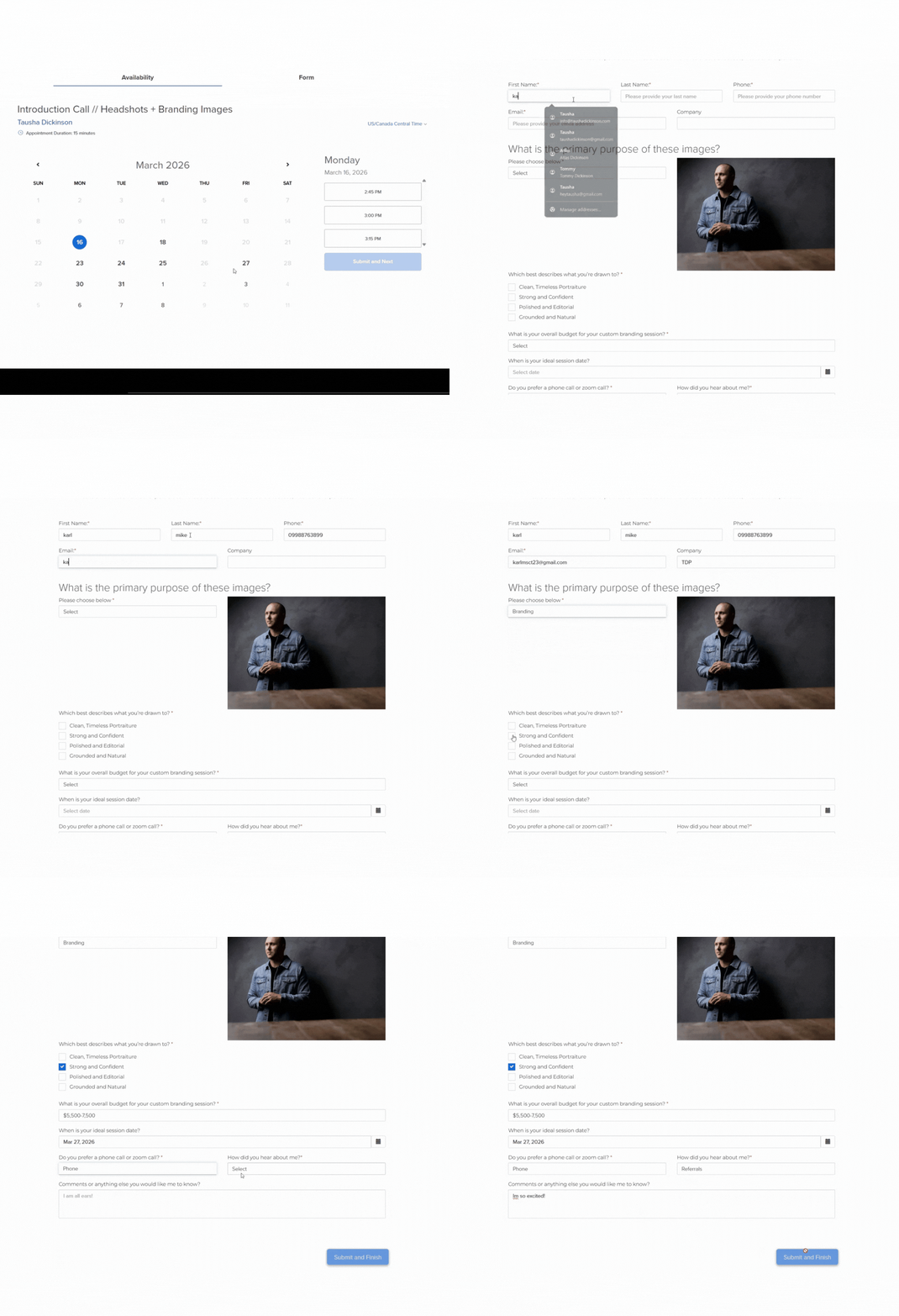
Client Inquiry Response:
Your CRM automatically creates a lead, tags it, and sends a confirmation email that acknowledges their inquiry immediately. This first touchpoint reassures them their message didn't disappear into the void and sets expectations for when they'll hear from you next.
Welcome Email/Proposal:
Within minutes, they receive a welcome email with pricing and next steps. This email should have a brief overview of what working together looks like, and a clear call to action. Whether that's scheduling a consultation call or reviewing your portfolio, remove any guesswork. The faster you provide clarity, the faster they can decide.

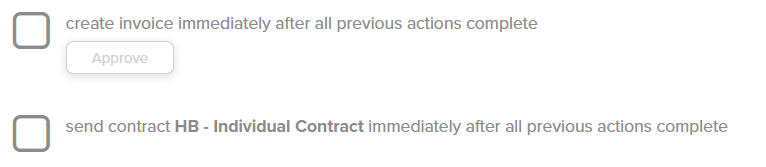

Contract + Invoice:
Once they say yes, your CRM sends the contract and invoice in one organized proposal. No more piecing together separate emails with attachments. Everything they need to officially book is delivered in a single, branded package. They can review terms, sign digitally, and pay a retainer without leaving the page. Friction kills momentum. Simplicity closes deals.
But here is the part photographers often skip: the contract is not just a formality. It is the foundation of the professional relationship. A signed contract protects your time, your creative rights, and your income. It sets clear expectations around cancellations, rescheduling, usage rights, and delivery timelines before any confusion has a chance to take root. Clients who feel clarity upfront trust you more. And trust converts to referrals.
If you are still sending invoices without a contract attached, or worse, shooting without one at all, that is not just a systems gap. It is a liability.
Session Reminder:
Once they say yes, your CRM sends the contract and invoice in one organized proposal. No more piecing together separate emails with attachments. Everything they need to officially book is delivered in a single, branded package. They can review terms, sign digitally, and pay a retainer without leaving the page. Friction kills momentum. Simplicity closes deals.

Gallery Delivery + Google Review:
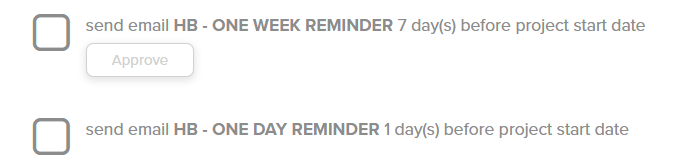
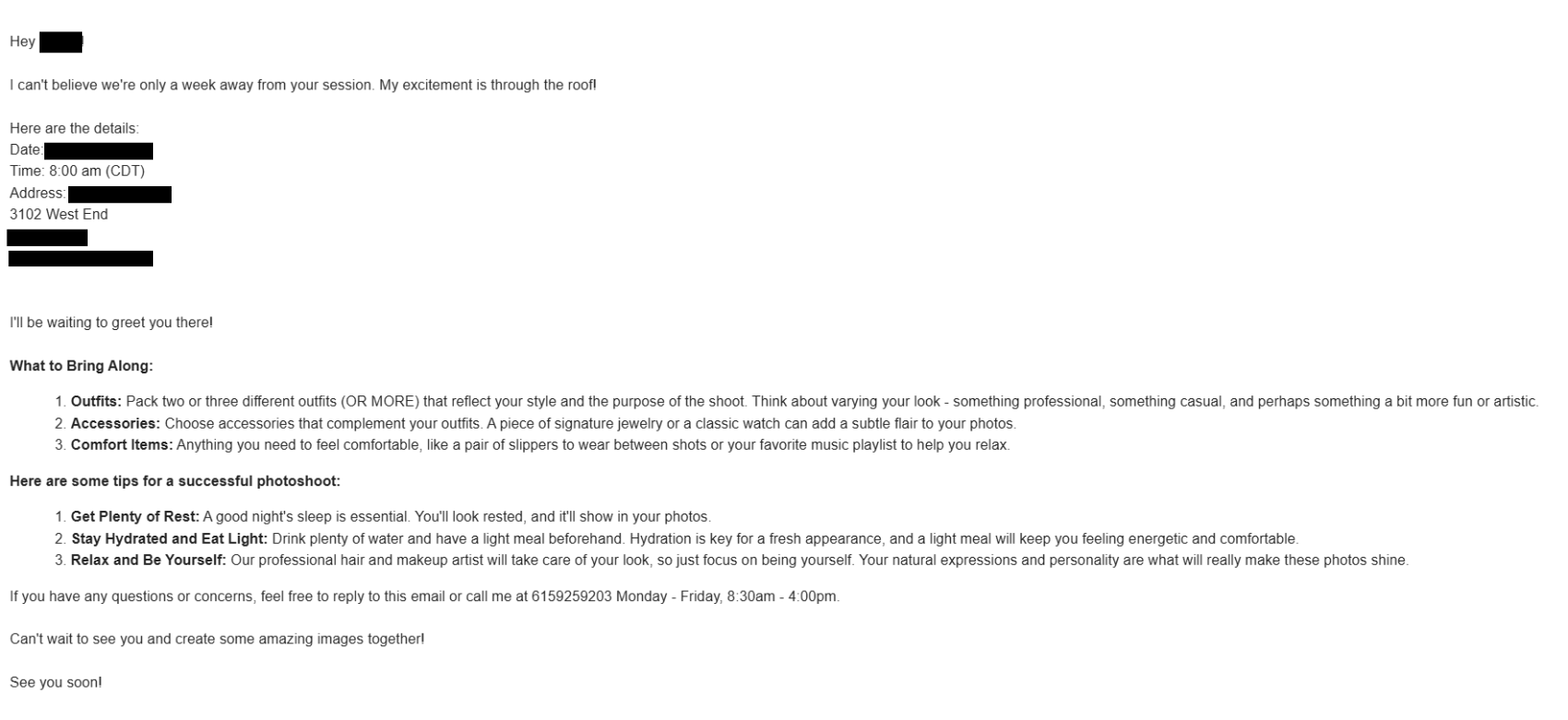
A week before the session, your client receives wardrobe guidance, location details, and what to expect on shoot day. Then a 24-hour reminder confirms the time, address, and any last-minute notes. These emails reduce no-shows, eliminate day-of confusion, and help your client show up confident and prepared.

That is a professional client journey.
Understand the differences between headshot, branding, and lifestyle sessions to align your workflows with client needs.
Why Most Photographers Avoid CRMs
Setting one up feels intimidating. You open the dashboard and immediately want to go adjust your lighting ratios instead.
But here is the truth:
You do not need perfection. You need structure.
Build one workflow. Test it. Refine it.
A CRM does not remove personality. It removes chaos.
The Revenue Shift No One Talks About
When you implement a CRM, something subtle happens.
You respond faster. You follow up consistently. You stop losing leads. You look polished. You reduce mental load. And when your brain is not holding dozens of small administrative tasks, you think bigger. You show up like a CEO instead of a stressed freelancer.
That shift changes everything.

Systems Create Creative Freedom
Photographers often think structure limits creativity. It does the opposite.
When your backend is organized, you are calm. You are not chasing invoices or digging through email threads. You are present on set.
Structure supports creativity. Chaos suffocates it.
If you are not sure which parts of your workflow are costing you the most time, the AI Time Audit can help you figure that out in about three minutes.
If you want to build stronger business systems overall, you may also want to read:
Business Is 80 Percent Systems and 20 Percent Talent
Talent might get you compliments. Systems get you paid.
Frequently Asked Questions About Using a CRM as a Photographer
What is the best CRM for photographers?
The best CRM for photographers is one that allows you to automate inquiries, send contracts and invoices, manage workflows, and track client communication in one place. Many photographers choose platforms like Dubsado because it offers customizable workflows, proposal templates, and automation designed for service-based businesses.
The key is not just the software. It is how you use it to build consistent systems.
Do I really need a CRM if I am a solo photographer?
Yes. Even solo photographers benefit from a CRM. A CRM prevents lost inquiries, automates follow-ups, organizes contracts, and tracks invoices. Without one, growth becomes limited by memory and manual processes.
If you want to build a scalable and profitable photography business, a CRM is foundational.
How does a CRM help increase photography bookings?
A CRM increases bookings by improving response time, ensuring consistent follow-ups, and creating a seamless client experience. Faster communication builds trust. Automated reminders prevent leads from going cold. Organized proposals make it easier for clients to say yes.
Often, photographers lose bookings due to slow or inconsistent communication rather than lack of talent.
How long does it take to set up a CRM for a photography business?
Most photographers can set up a basic workflow in a few days. Start with one simple automation: inquiry to proposal to contract to invoice. Once that system is tested, you can gradually expand into reminders, prep guides, and post-session follow-ups.
You do not need a perfect system to begin. You need a functional one.
Can automation feel impersonal to clients?
Automation does not remove personality. It removes chaos. You can still personalize emails and adjust communication as needed. Automation simply ensures no client falls through the cracks.
A well-designed CRM workflow actually improves the client experience because communication is timely and consistent.
What happens if I do not use a CRM in my photography business?
Without a CRM, photographers often rely on inbox organization, spreadsheets, or memory. This increases the likelihood of missed follow-ups, delayed responses, forgotten invoices, and inconsistent client experiences.
Over time, those small inefficiencies limit growth and increase stress.
Is a CRM only necessary for commercial photographers?
No. Whether you specialize in headshots, branding, portraits, weddings, or commercial photography, structured systems support profitability. As your bookings increase, organization becomes critical.
A Nashville Photographer serving corporate clients may need advanced workflows, but even newer photographers benefit from starting early with structured systems. For transparency on what clients invest in professional headshots and branding, see my full Nashville pricing guide.
Ready to automate your workflows and elevate your professional presence? Contact me for Nashville branding photography or headshot sessions.